HackTheBox Sherlocks - OpTinselTrace-5

Scenario
You'll notice a lot of our critical server infrastructure was recently transferred from the domain of our MSSP - Forela.local over to Northpole.local. We actually managed to purchase some second-hand servers from the MSSP who have confirmed they are as secure as Christmas is! It seems not as we believe Christmas is doomed and the attackers seemed to have the stealth of a clattering sleigh bell, or they didn’t want to hide at all!!!!!! We have found nasty notes from the Grinch on all of our TinkerTech workstations and servers! Christmas seems doomed. Please help us recover from whoever committed this naughty attack! Please note - these Sherlocks are built to be completed sequentially and in order!
Investigation
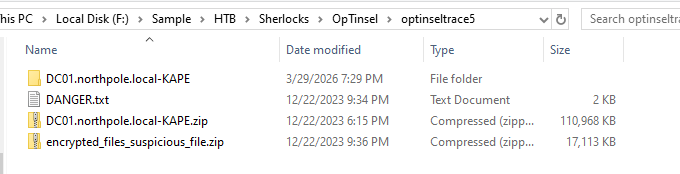
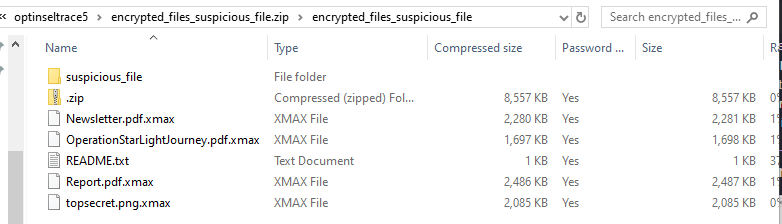
On this sherlock, we have KAPE triage with a zip file contains ransomware and the file need to be recovered.

We have ransomware inside suspicious_file folder so handle it with care, you won't likely accidently execute it as it is DLL file but better be safe out there.
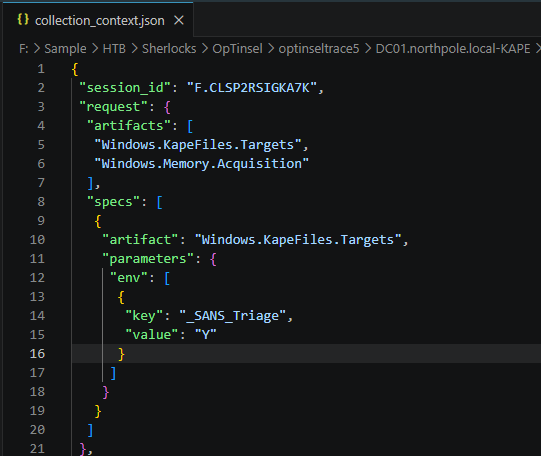
From the collection_context.json reveals that the collection was conducted using 2 artifacts from velociraptor the first artifact is KAPE Triage with SANS_Triage as the target and the second artifact is Memory Acquisition but we don't have it here.
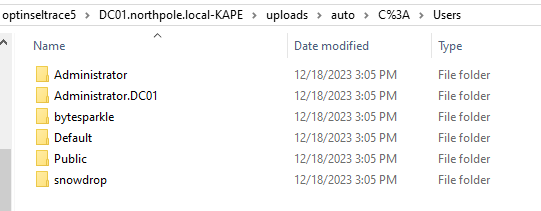
Now i'm interesting in any user folder in Users folder as any domain user or any local user that can login into the domain controller will have their own user folder and look like we have at least 3 here from local administrator, bytesparkle and snowdrop
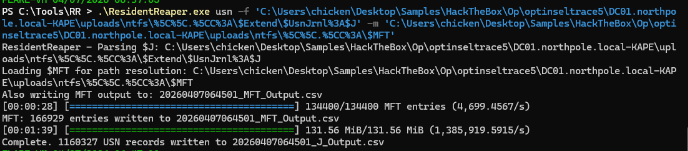
Now it is the time to parse artifacts, I will use my ResidentReaper tool to parse both USN Journal and MFT, the result of this tool is parity with MFTECmd but faster because it is written in Rust.

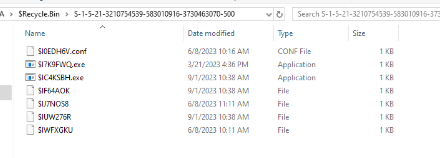
I also noticed some interesting $I files in the recycle bin of 2 users so I will use RECmd.exe from EZ tool to parse them.
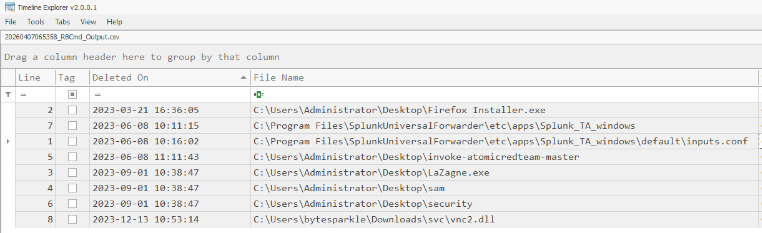
Interestingly, there are LaZagne, backup of SAM and SECURITY hives, atomic red team and suspicious dll being deleted, and according to the timeline of the previous intrusion in OpTinselTrace-4, the vnc2.dll was deleted after that so I will keep that in mine
Command: .\RBCmd.exe -d 'C:\Users\chicken\Desktop\Samples\HackTheBox\Op\optinseltrace5\DC01.northpole.local-KAPE\uploads\auto\C%3A\$Recycle.Bin' --csv 'C:\Users\chicken\Desktop\Samples\HackTheBox\Op\optinseltrace5\DC01.northpole.local-KAPE\uploads'
Now I will also parse Windows Event log as we are dealing with the domain controller so event log would be a huge resource that will aid us in this investigation.
Command:
.\EvtxECmd.exe -f 'C:\Users\chicken\Desktop\Samples\HackTheBox\Op\optinseltrace5\DC01.northpole.local-KAPE\uploads\auto\C%3A\Windows\System32\winevt\Logs\Security.evtx' --csv 'C:\Users\chicken\Desktop\Samples\HackTheBox\Op\optinseltrace5\DC01.northpole.local-KAPE\uploads'
.\EvtxECmd.exe -f 'C:\Users\chicken\Desktop\Samples\HackTheBox\Op\optinseltrace5\DC01.northpole.local-KAPE\uploads\auto\C%3A\Windows\System32\winevt\Logs\Windows PowerShell.evtx' --csv 'C:\Users\chicken\Desktop\Samples\HackTheBox\Op\optinseltrace5\DC01.northpole.local-KAPE\uploads'
.\EvtxECmd.exe -f 'C:\Users\chicken\Desktop\Samples\HackTheBox\Op\optinseltrace5\DC01.northpole.local-KAPE\uploads\auto\C%3A\Windows\System32\winevt\Logs\Microsoft-Windows-PowerShell%254Operational.evtx' --csv 'C:\Users\chicken\Desktop\Samples\HackTheBox\Op\optinseltrace5\DC01.northpole.local-KAPE\uploads'
.\EvtxECmd.exe -d 'C:\Users\chicken\Desktop\Samples\HackTheBox\Op\optinseltrace5\DC01.northpole.local-KAPE\uploads\auto\C%3A\Windows\System32\winevt\Logs\' --csv 'C:\Users\chicken\Desktop\Samples\HackTheBox\Op\optinseltrace5\DC01.northpole.local-KAPE\uploads'
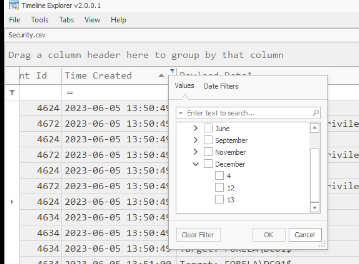
After opened any of the output log in Timeline Explorer, There are only events in 12-13 November 2023 that fit with the narrative/timeline so let's focus on both days and start our investigation.
Task 1: Which CVE did the Threat Actor (TA) initially exploit to gain access to DC01?
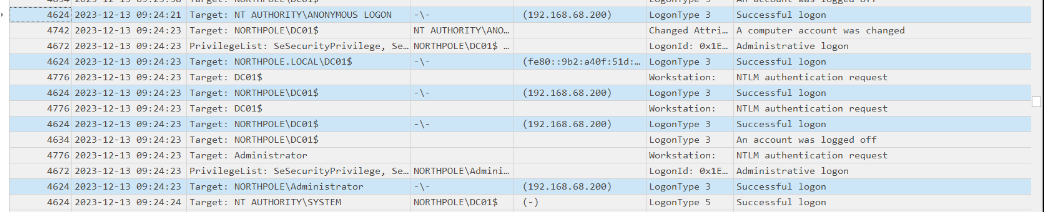

This one is quite trickey, I have to look at the behavior of each IP logged in event log and I discovered that the IP address of 192.168.68.200 which after looking at the event happened around 2023-12-13 09:24:21~,
the log closely the ZeroLogin exploitation where the exploitation script started with NULL/ANONYMOUS LOGON and then follow by the password reset of the domain controller computer account
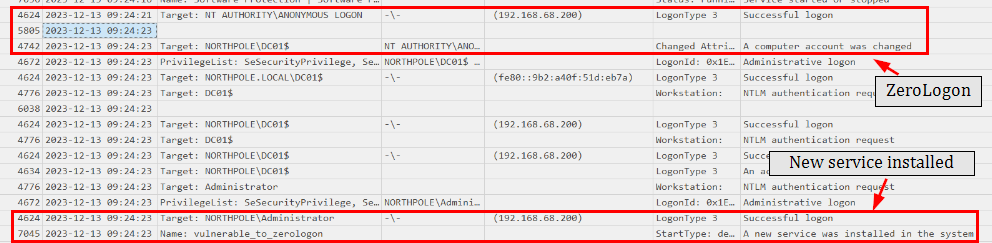
The netlogon event from Event ID 5805 (System event log) also confirmed that this is indeed ZeroLogon (CVE-2020-1472) exploitation and this exploit was followed by the creation of vulnerable_to_zerologon service, the obvious indicator right there.
CVE-2020-1472
Task 2: What time did the TA initially exploit the CVE? (UTC)
2023-12-13 09:24:23
Task 3: What is the name of the executable related to the unusual service installed on the system around the time of the CVE exploitation?
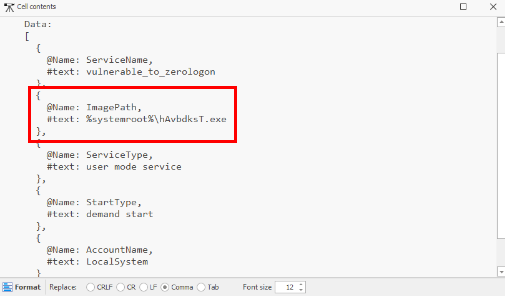
We can look at the ImagePath of the vulnerable_to_zerologon service discovered eariler and we can see that the name is very random. this is likely PSEXEC-like service execution on the target system to get a session as SYSTEM on target computer if we have local administrator privilege which from the security log earilier, the threat actor already compromised DC$ and local Administrator account
hAvbdksT.exe
Task 4: What date & time was the unusual service start?

We can look at the event ID 7036 to determine the service start or stop time and we can see that after installation, a second later, this service was started.
2023-12-13 09:24:24
Task 5: What was the TA's IP address within our internal network?
192.168.68.200
Task 6: Please list all user accounts the TA utilised during their access. (Ascending order)
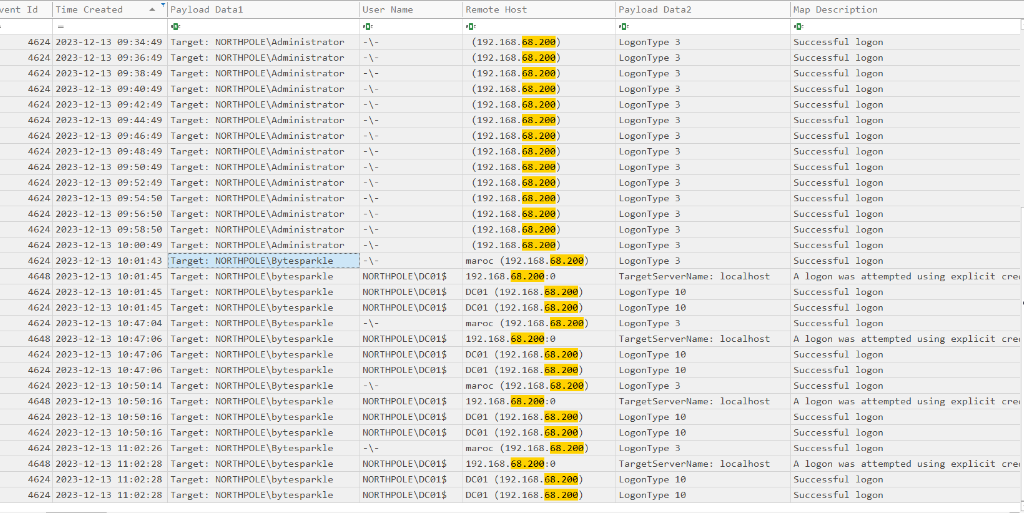
As we already determined the IP address used by the threat actor, we can filter it in the output event log and we can see that beside Administrator, Bytesparkle was also compromised as well.
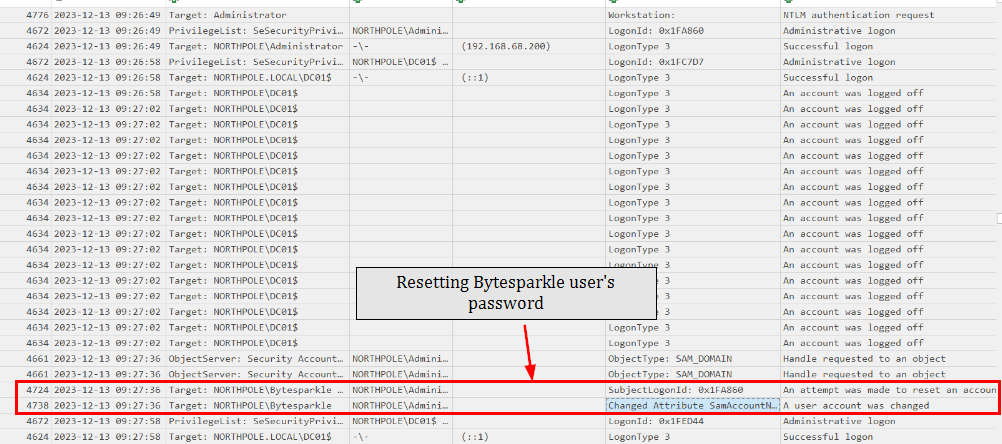
Prior to this, we can see that the Bytesparkle user password was reset at 09:27:36
Administrator, Bytesparkle
Task 7: What was the name of the scheduled task created by the TA?
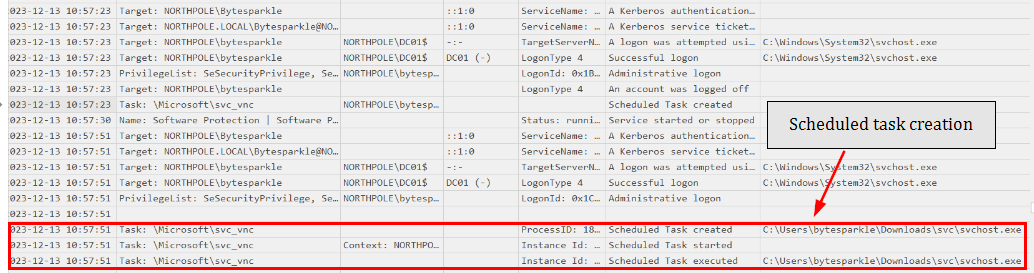
We can look at the Event ID 106 which reveals that the scheduled task svc_vnc was created with the suspicious svchost.exe to be executed.
svc_vnc
Task 8: Santa's memory is a little bad recently! He tends to write a lot of stuff down, but all our critical files have been encrypted! Which creature is Santa's new sleigh design planning to use?
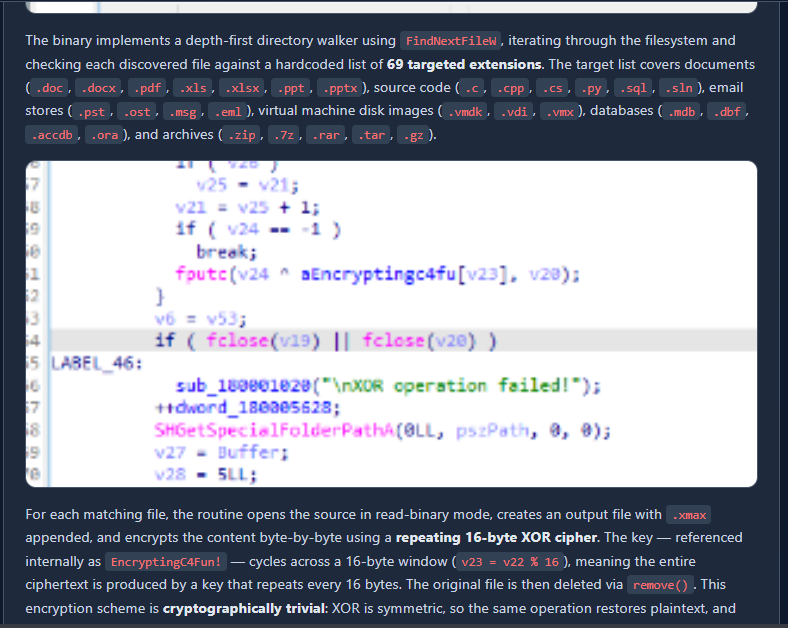
We can reverse the dll file which is the ransomware which reveals that it will encrypt file that match 69 extensions and encrypt it using XOR key "EncryptingC4Fun!" and all files will be append with ".xmax" extension to indicates the encrypted file

The following scirpt can be used to decrypt all files that was encrypted by this ransomware
#!/usr/bin/env python3
"""
.xmax File Decryptor
--------------------
Scans a target directory for files with the .xmax extension,
decrypts them using XOR with key 'EncryptingC4Fun!', restores
the original filename, and removes the encrypted copy.

Usage:
    python xmax_decrypt.py <target_directory> [--dry-run]
"""

import os
import sys
import argparse
import logging

XOR_KEY = b"EncryptingC4Fun!"

logging.basicConfig(
    level=logging.INFO,
    format="%(asctime)s [%(levelname)s] %(message)s",
    datefmt="%Y-%m-%d %H:%M:%S"
)
log = logging.getLogger(__name__)


def xor_decrypt(data: bytes, key: bytes) -> bytes:
    key_len = len(key)
    return bytes(b ^ key[i % key_len] for i, b in enumerate(data))


def find_xmax_files(root: str):
    for dirpath, _, filenames in os.walk(root):
        for fname in filenames:
            if fname.endswith(".xmax"):
                yield os.path.join(dirpath, fname)


def decrypt_file(filepath: str, dry_run: bool = False) -> bool:
    original_path = filepath[:-5]  # strip .xmax

    if os.path.exists(original_path):
        log.warning(f"Skipping — original already exists: {original_path}")
        return False

    try:
        with open(filepath, "rb") as f:
            encrypted_data = f.read()

        decrypted_data = xor_decrypt(encrypted_data, XOR_KEY)

        if dry_run:
            log.info(f"[DRY RUN] Would restore: {filepath} -> {original_path}")
            return True

        with open(original_path, "wb") as f:
            f.write(decrypted_data)

        os.remove(filepath)
        log.info(f"Restored: {original_path}")
        return True

    except PermissionError:
        log.error(f"Permission denied: {filepath}")
    except OSError as e:
        log.error(f"OS error on {filepath}: {e}")

    return False


def main():
    parser = argparse.ArgumentParser(description="Decrypt .xmax files using XOR key.")
    parser.add_argument("target", help="Directory to scan")
    parser.add_argument("--dry-run", action="store_true", help="Preview without making changes")
    args = parser.parse_args()

    if not os.path.isdir(args.target):
        log.error(f"Target is not a valid directory: {args.target}")
        sys.exit(1)

    log.info(f"Scanning: {args.target}")
    if args.dry_run:
        log.info("Dry-run mode enabled — no files will be modified")

    total = recovered = skipped = failed = 0

    for xmax_file in find_xmax_files(args.target):
        total += 1
        result = decrypt_file(xmax_file, dry_run=args.dry_run)
        if result:
            recovered += 1
        elif os.path.exists(xmax_file[:-5]):
            skipped += 1
        else:
            failed += 1

    log.info(f"Done — Total: {total} | Recovered: {recovered} | Skipped: {skipped} | Failed: {failed}")


if __name__ == "__main__":
    main()
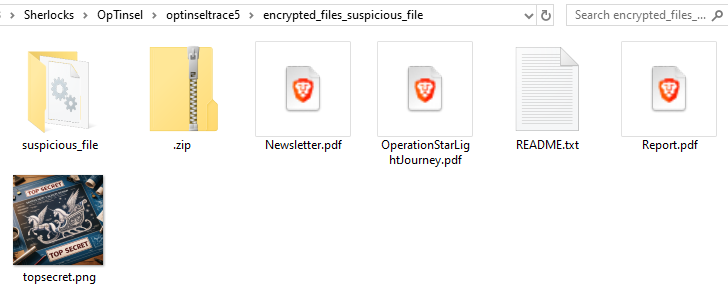
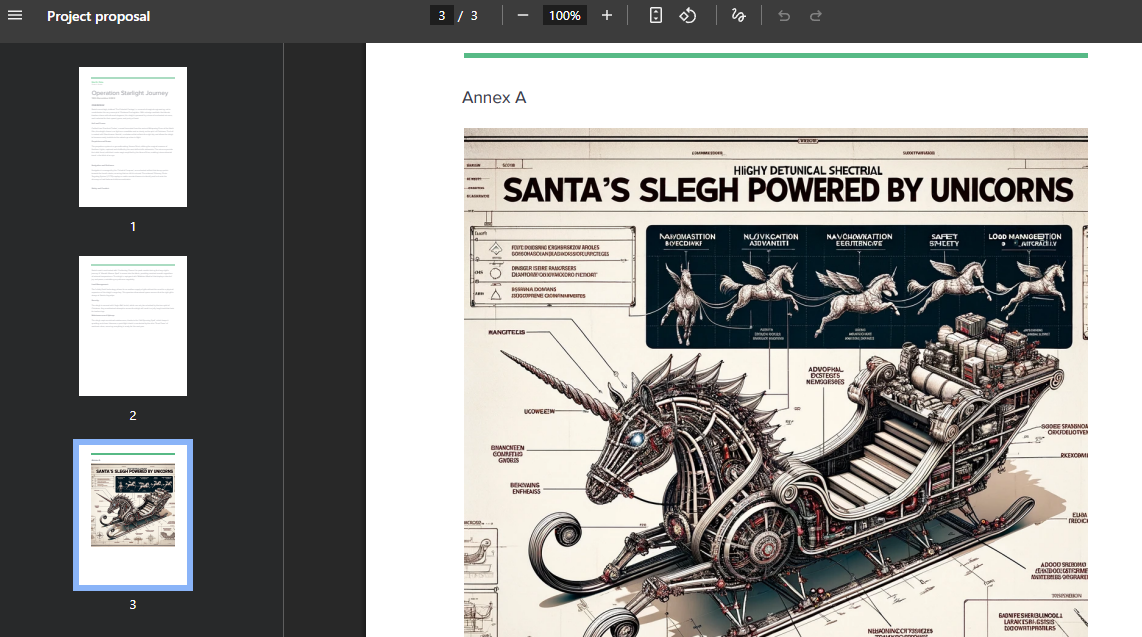
And then we can see the Unicorn is used in the new Santa's sleigh design from the decrypted files.
Unicorn
Task 9: Please confirm the process ID of the process that encrypted our files.
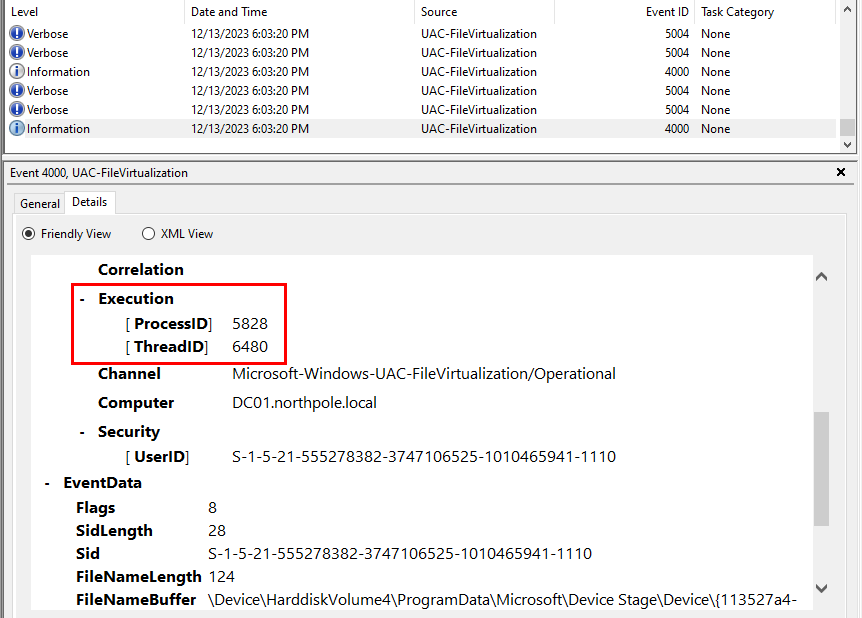
To find out about this, we need to look at the UAC-Virtualization log it log the protected system path and we can see that the ransomware attempted to encrypt protected file and we can get the process ID of the ransomware here.
5828
 https://labs.hackthebox.com/achievement/sherlock/1438364/582